
Plant spacing calculator
Enter your bed size and pick a plant or type your own spacing. You get how many plants fit, on a square or staggered grid.
Recent
Your last 10 settings, saved only in this browser. Nothing is uploaded.
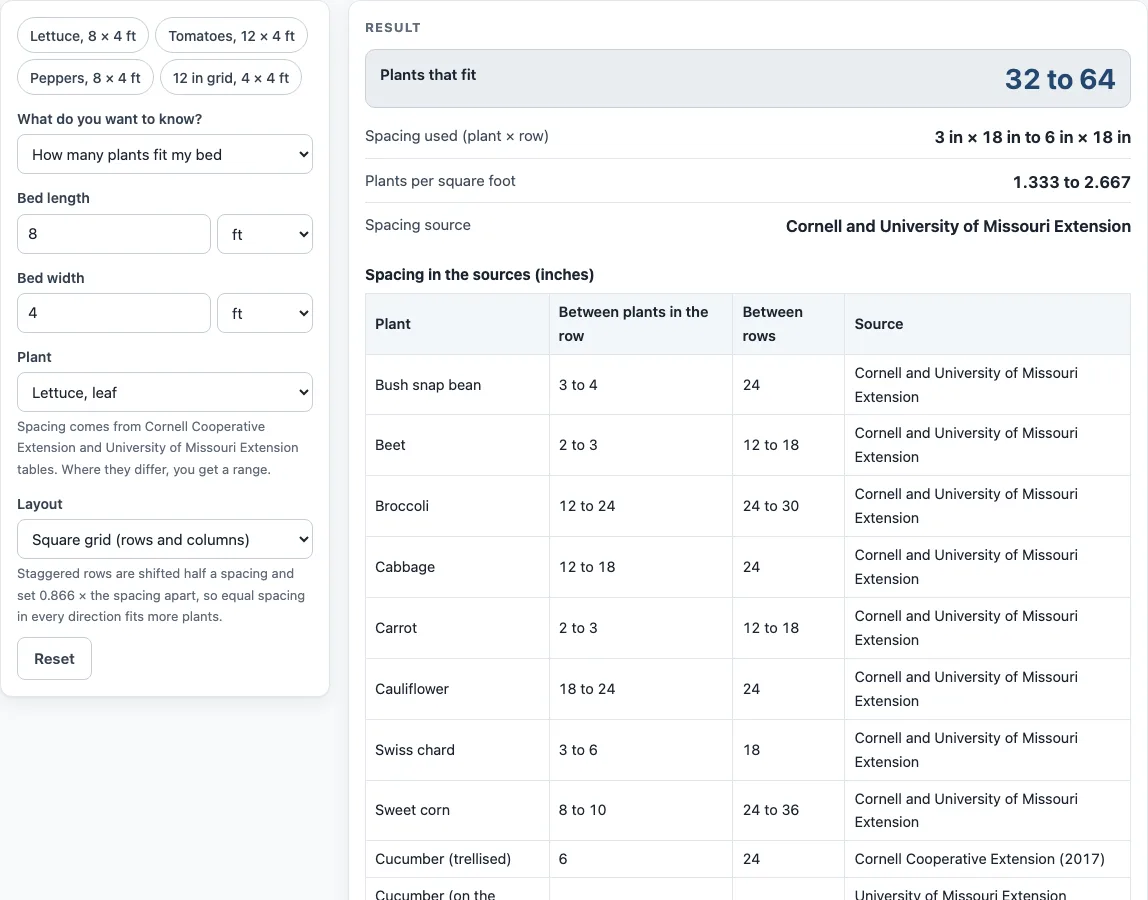
How to use the Plant spacing calculator
- Under “What do you want to know?”, choose “How many plants fit my bed” or “How big a bed I need”.
- Type “Bed length” and “Bed width” in feet, inches, meters or centimeters. The bed-size mode needs only the width.
- Under “Layout”, pick “Square grid (rows and columns)” or “Staggered (triangular) grid”.
- Under “Plant”, choose one of the 27 vegetables, or “My own spacing” and type “Space between plants (inches)”. On a square grid, also type “Space between rows (inches)”.
- If a preset shows a range, read both ends. The tool counts plants at the closest spacing and at the widest.
- In the bed-size mode, type “Number of plants wanted”. It must be a whole number.
- Read the results. The first mode shows “Plants that fit”, “Spacing used (plant × row)”, “Plants per square foot” and “Spacing source”. The second shows “Bed length needed” and “Bed area needed”, the shortest bed that holds your number.
- Read any warning. One appears when no plant fits, and another when a staggered layout is used with a crop preset.
If a size is blank, zero, negative or not a number, or you ask for a fractional number of plants, an error appears instead of a result.
Presets are the quickest route for vegetables. For herbs and flowers, type your own spacing, because no extension table with reliable figures for them was found. A table on the page lists every preset figure and its source.
How does a plant spacing calculator count plants?
A plant spacing calculator treats the bed as a grid of cells, one plant per cell. On a square grid, the count is the number of in-row spacings that fit the length, multiplied by the number of row spacings that fit the width. The formula is floor(length ÷ in-row spacing) × floor(width ÷ row spacing). “Floor” means you round down to a whole number, because a partial plant does not fit. The first plant sits half a spacing in from the edge, so the spacing is measured cell by cell rather than from the edge to the edge.
Plants per square foot is also worked out from the spacing. On a square grid it is 144 ÷ (spacing × row spacing), where the spacing is in inches. The 144 comes from the 144 square inches in one square foot.
Take leaf lettuce in an 8 ft × 4 ft bed on a square grid. At 6 inches apart, you get 16 plants per row across 2 rows, which is 32 plants. At 3 inches apart, you get 32 plants per row across 2 rows, which is 64. Rows are 18 inches apart in this example. The result is therefore a range of 32 to 64 plants, depending on which spacing you choose.
What is a staggered grid, and does it fit more plants?
A staggered grid, also called a triangular grid, shifts alternate rows by half a spacing so each plant sits between two plants in the row above. The row spacing is set by the plant spacing multiplied by 0.866, which is the sine of 60 degrees. Alternate rows then hold floor(length ÷ spacing − 1/2) plants.
Plants per square foot on a staggered grid is 144 ÷ (spacing² × 0.866). The staggered layout does not always give more plants. In a 4 ft × 4 ft bed with 12 inch spacing, a staggered grid fits 14 plants, while a square grid fits 16. The result depends on the bed size and the spacing, so it is worth running both layouts and comparing.
Results are calculated from your inputs. Plant sizes vary by variety, so use the count as a planning estimate.
Sources (checked 15 October 2026): blogs.cornell.edu · extension.missouri.edu
Worked examples
| Input | Result |
|---|---|
| Lettuce, leaf, 8 × 4 ft, Square grid (rows and columns) | 32 to 64 plants |
| Tomato, staked, 12 × 4 ft, Square grid (rows and columns) | 8 plants |
| 12 in spacing, 4 × 4 ft, Staggered (triangular) grid | 14 plants |
| Carrot, 2.4 × 1.2 m, Square grid (rows and columns) | 62 to 141 plants |
| 12 × Pepper, bed 4 ft wide | bed 18 to 18 ft long, 72 to 72 sq ft |
Calculated by the tool above; open it with the same values to see each step.
Frequently asked questions
Why does the tool show a range for some vegetables?
Cornell Cooperative Extension and the University of Missouri Extension do not always give the same spacing for a crop. Where they differ, the page shows the range and counts plants at both ends. The table on the page lists each figure and its source.
Which units can I type for the bed size?
You can type the bed length and width in feet, inches, meters or centimeters. The tool works out the count from those measurements. Blank, zero, negative or non-numeric sizes show an error instead of a result.
Can I use this for herbs and flowers?
Yes. Type your own spacing in inches, because the presets cover vegetables only. No extension table with reliable herb or flower figures was found, so the spacing you enter is the one the tool uses.
Why does a warning appear when I use a staggered layout with a crop preset?
A staggered layout sets the row spacing itself, so the between-row figure in the preset is ignored. The warning tells you this so you are not misled about the row spacing.
What does “no plant fits” mean?
It means the spacing you chose is wider than the bed in one or both directions, so the count is zero. Try a smaller spacing, a longer bed, or a wider bed.
Does the plant spacing calculator send my measurements anywhere?
No. Everything runs in your browser, and nothing you type is uploaded. The tool is free, and no sign-up is needed.
Related tools
- Garden materials calculators: use it to see the soil, compost and mulch tools for a new bed.
- Compost calculator: use it to estimate how much compost a garden bed needs before you fill it.
- Patio umbrella size chart and calculator: use it to choose an umbrella size for a seating area.
- Pergola cost calculator: use it when you are weighing the cost of a pergola over a patio.
- Raised bed soil calculator: use it to work out how much soil a raised bed needs.
- Square foot gardening chart and planner: use it if you plan your beds by the square foot.