
Paver Calculator
Enter the area and pick a paver size, joint width and extra for cuts to see how many pavers to buy, how many fit in a square foot, and the cost at your own price.
Recent
Your last 10 settings, saved only in this browser. Nothing is uploaded.
The paver calculator tells you how many pavers to buy for a paved area. Enter an area as a rectangle, circle, triangle or a total you already know, choose a paver size, and the tool returns the number of pavers with extra for cuts and spares, plus the count with no extra. It works for patios, walkways and other flat paved areas. It also shows the area each paver covers and how many pavers fit in one square foot, which helps when you compare sizes.
You can pick a common paver size or type your own in inches. Results are calculated from your inputs, so measure carefully and check the joint width against the product you plan to buy. The tool runs in your browser, it is free, and no sign-up is needed. Nothing you enter is uploaded.
How to use the paver calculator
- Under “Shape of the area”, choose a rectangle (length and width), a circle (diameter), a triangle (base and height), or a total area you already know.
- Enter your measurements and pick feet or meters under “Measure in”. The area appears in square feet and square meters.
- Under “Paver size (inches)”, pick 4 × 8, 6 × 6, 6 × 9, 12 × 12, 16 × 16 or 24 × 24 in, or choose “Other size (type it)” and fill in “Paver length (in)” and “Paver width (in)”.
- Enter “Joint width (in)”. The default is 1/8 in (0.125). Type 0 if the paver size already includes the joint, as many modular pavers do.
- Check “Extra for cuts and spares (%)”. It defaults to 10%.
- Optional, under advanced options: enter “Pavers per pallet (optional)” from the product label to see the number of pallets, exact and rounded up.
- Optional: enter “Price per paver (optional, $)” to see the paver cost.
- Read the results: “Pavers to buy”, “Pavers with no extra”, “Area per paver incl. joint” and “Pavers per square foot”. If a warning appears, review your joint width or extra percentage before buying.
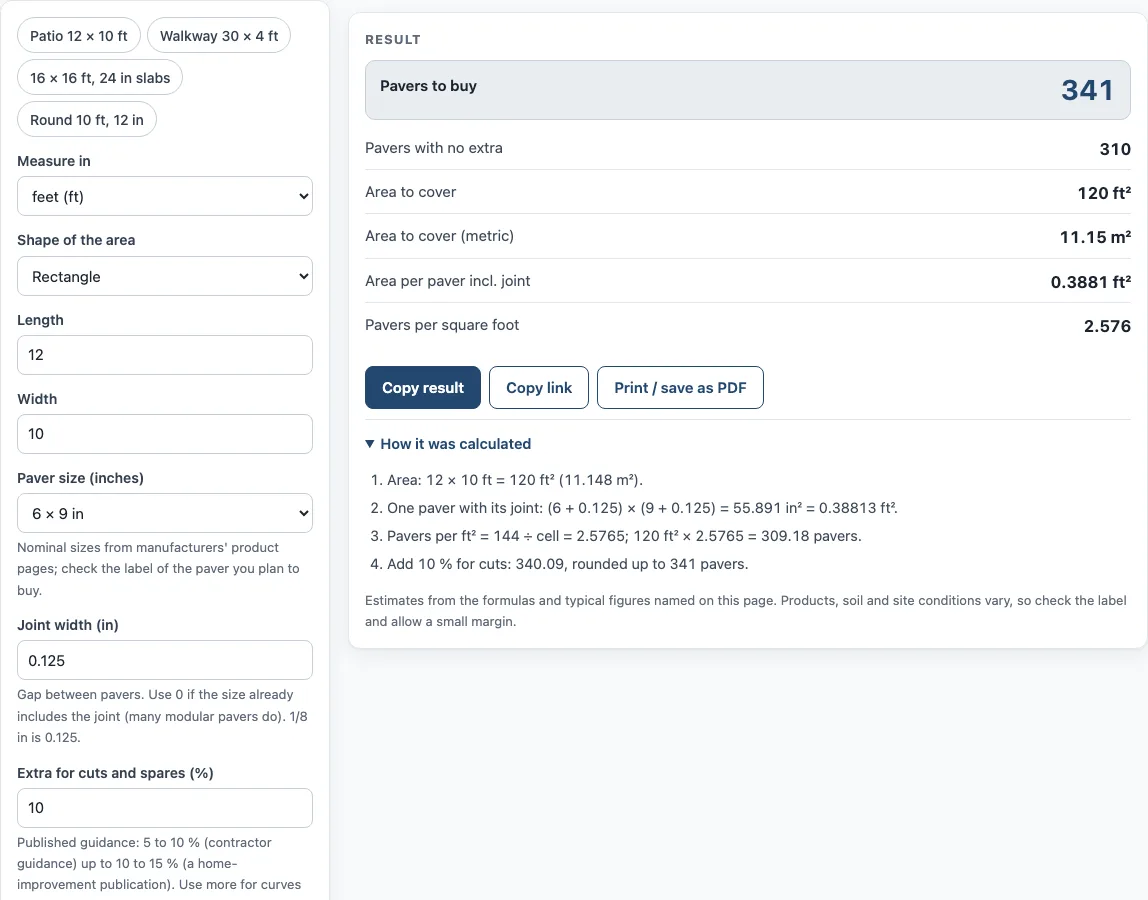
If you want a starting point, use one of the four presets: a 12 × 10 ft patio in 6 × 9 pavers, a 30 × 4 ft walkway in 4 × 8 pavers, a 16 × 16 ft area in 24 in slabs with a 1/4 in joint, or a 10 ft round area in 12 in pavers. If you enter a blank, zero, negative or non-numeric value, the tool shows an error message instead of a result.
How many pavers do I need?
To estimate the number of pavers, the calculator first finds the area of your space in square feet. For a rectangle, that is length times width. For a circle, it uses π × (diameter ÷ 2)². For a triangle, it uses base times height divided by two. Next, it finds how much area one paver covers, including the joint. Each paver’s footprint is (length + joint) × (width + joint), measured in square inches. Dividing 144 by that footprint gives the pavers per square foot, because a square foot is 144 square inches.
Multiplying the area by the pavers per square foot gives the count with no extra. The calculator then adds your extra percentage to the exact figure and rounds up to a whole paver. For example, a 12 × 10 ft area (120 ft²) in 6 × 9 in pavers with a 1/8 in joint needs 310 pavers with no extra. With 10% extra, the count is 341 pavers. The pavers per square foot in this example is 2.576.
A brick paver calculator like this one gives an estimate from the numbers you type. It cannot see the ground, edges, borders or pattern layout, so the extra percentage is there to cover cuts and breakage. The default of 10% sits inside a range given by contractor guidance (5 to 10%) and a home-improvement publication (10 to 15%). If you type a value over 30% or set it to 0%, the tool shows a warning.
How do paver sizes and joint width change the count?
Paver sizes are typical sizes from the named sources, not fixed standards. Sizes vary by manufacturer, and the same nominal size can measure slightly differently. For instance, a nominal 16 × 16 paver may measure 15.75 in. The calculator uses the nominal size you select or type, so check the actual dimensions on the product label if they differ.
Some modular 4 × 8 pavers measure 3.94 × 7.87 in (100 × 200 mm) and already include a spacer joint. For these, set the joint width to 0. If you add a joint on top of a size that already includes one, the footprint will be too large and the count too low.
The joint width changes the footprint, so a wider joint means fewer pavers per square foot. The default of 1/8 in sits inside the 1/16 to 3/16 in joint range in a public paving specification, but the calculator accepts any value you type in inches. Joint widths over 1 in trigger a warning. The paver thickness is not used in the calculation, so you will need to confirm thickness separately for your project. The calculator also does not compute base gravel or prices unless you type them in.
Sources (checked 15 October 2026): orders.oldcastleapg.com · pavestone.com · landscapeguides.bramptonbrick.com · belgard.com · halquiststone.com · basalite.com · thisoldhouse.com · ia.iowadot.gov · homedepot.com · belgard.com · belgard.com
Worked examples
| Input | Result |
|---|---|
| 120 ft², paver 6 × 9 in, joint 0.125 in, 10 % extra | 341 pavers |
| 400 ft², paver 12 × 12 in, joint 0.125 in, 10 % extra | 431 pavers |
| 78.54 ft², paver 4 × 8 in, joint 0 in, 15 % extra | 407 pavers |
| 129.2 ft², paver 24 × 24 in, joint 0.25 in, 5 % extra | 34 pavers |
| 300 ft², paver 7.87 × 3.94 in, joint 0 in, 10 % extra | 1533 pavers |
Calculated by the tool above; open it with the same values to see each step.
Frequently asked questions
Can the paver calculator work with a circular area?
Yes. Choose the circle shape and enter the diameter. The tool finds the area from the diameter and then calculates the paver count. For example, a circle 10 ft across (78.54 ft²) in 4 × 8 in pavers with no joint and 15% extra needs 407 pavers.
What is the joint width, and what should I enter?
The joint width is the gap between pavers, typed in inches. The default is 1/8 in (0.125). Enter 0 if the paver size already includes the joint, which many modular pavers do. Check the product information if you are unsure.
Why does the calculator add extra pavers?
Extra covers cuts at edges and spares for breakage. The default is 10%, which you can change in the “Extra for cuts and spares” box. Higher values give more spares, but the tool warns you above 30%.
Can I use metric measurements?
Yes. You can enter the area in feet or meters. The result shows the area in both square feet and square meters. Paver sizes are entered in inches, so convert any metric paver dimensions before typing them.
Does the calculator tell me how much gravel or sand I need?
No. The calculator counts pavers only. It does not compute base gravel or sand, and it holds no prices. Use the Paver Base Calculator for the base and the Paver Sand Calculator for sand. If you type a price per paver, it shows the paver cost, and you can enter “Pavers per pallet (optional)” to get a pallet count.
What do the warnings mean?
A warning appears if the joint width is over 1 in, if the extra percentage is over 30%, or if the extra is 0%. A warning does not stop the calculation. It is a prompt to double-check your numbers before you order.
Related tools
- Paver Patio Cost Calculator: use it when you want to plan the overall cost of a paver patio.
- Paver Base Calculator: use it to work out the crushed base under the same area.
- Paver Sand Calculator: use it when you need to estimate the sand for the paver bed and joints.
- Flagstone (Flagging) Calculator: use it when you are planning irregular stone pieces instead of uniform pavers.
- Lawn Area Calculator: use it when you need the area of a lawn before planning other ground work.
- Sod Calculator: use it when you plan to lay sod around a new paved area.
- Grass Seed Calculator: use it when you plan to seed bare ground next to your paving.
- Artificial Turf Installation Cost Calculator: use it when you are weighing artificial turf as an alternative to a grass lawn.