
Paver Base Calculator
Enter the paved size and the compacted base depth. You get cubic yards and tons of crushed base, the bedding sand under the pavers and the fabric area, with the depth ranges published guides give.
Recent
Your last 10 settings, saved only in this browser. Nothing is uploaded.
How to use the Paver Base Calculator
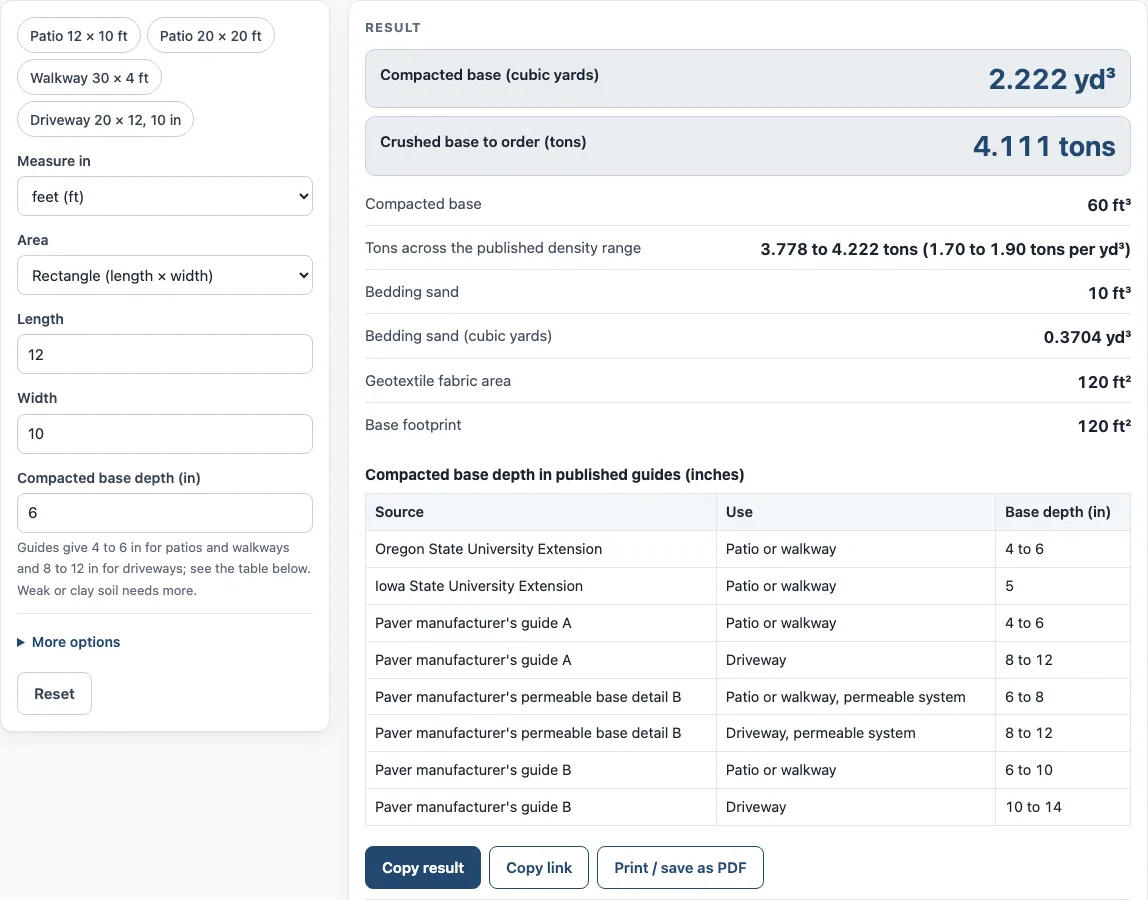
- Pick a preset if one fits: “Patio 12 × 10 ft” (6 in), “Patio 20 × 20 ft” (6 in), “Walkway 30 × 4 ft” (4 in), or “Driveway 20 × 12, 10 in”. Otherwise, enter your own values.
- Under “Measure in”, pick feet or meters. Then, under “Area”, choose “Rectangle (length × width)” and enter Length and Width, or choose “Total area (already known)” and enter that area.
- Type the “Compacted base depth (in)”. It defaults to 6 in. A table of published depths sits below the results.
- In the advanced options, if the base extends past the paved edge, enter inches in “Base extends past the edge (in)”. It is available for the rectangle only and widens the base and fabric on every side. The bedding sand stays on the paved size. The default is 0.
- Check “Bedding sand depth (in)”. It defaults to 1 in. Enter 0 to skip the sand.
- Leave “Base weight (tons per yd³, compacted)” at 1.85, or edit it. A second output, “Tons across the published density range”, shows the tons across 1.70 to 1.90.
- Enter “Extra for uneven ground (%)” if you want one. It defaults to 0.
- Optionally type your own prices: “Your price per ton of base”, “Your price per yd³ of sand”, “Your price per ft² of fabric”, “Sales tax (%)” and “Delivery fee”. Cost lines only show what you type.
- Read the results, such as “Compacted base”, “Crushed base to order (tons)”, “Bedding sand” and “Geotextile fabric area”, and any warnings.
After you pick a preset, every field can still be changed.
How much paver base do I need?
The amount depends mainly on the base depth you choose, and the tool leaves that choice to you. The depth defaults to 6 in. Published ranges differ. Oregon State University Extension lists 4 to 6 in, Iowa State University Extension lists 5 in, and a permeable-base detail lists 6 to 8 in for a patio. One paver manufacturer gives 4 to 6 in for patios and 8 to 12 in for driveways, and another gives 6 to 10 in for patios and 10 to 14 in for driveways. Oregon State also notes a thicker base for soft clay or areas that vehicles drive on. The sources differ, so pick the depth that matches the guidance you are following and check local requirements.
How is paver base volume worked out?
The volume is the base footprint in square feet, multiplied by the depth in inches, divided by 12, and then multiplied by 1 plus any extra percent. The result is in cubic feet. Dividing by 27 converts it to cubic yards. Tons equal cubic yards times tons per cubic yard of compacted base.
The default of 1.85 comes from a state transportation department manual, which gives 1.70 to 1.90 for compacted gravel base and says the weights are dry. Commercial suppliers quote loose stone at about 1.35 to 1.5 tons per cubic yard. The tool uses the compacted figure because the volume it calculates is compacted volume. The second output shows the spread across 1.70 to 1.90 so you can see how much the weight could move the order.
Bedding sand is calculated from the paved area, not the wider base. It equals paved area times depth in inches, divided by 12. The default is 1 in, which matches extension guidance to screed about 1 in, between 1 and 1 1/2 in. The geotextile area equals the base footprint in ft². Add overlap at seams yourself, since the tool does not add it.
Worked example: a 12 × 10 ft patio with a 6 in base is 60 ft³, or 2.222 yd³, or 4.111 tons at 1.85 tons per yd³. Across 1.70 to 1.90 that is 3.778 to 4.222 tons. It also needs 10 ft³ of bedding sand and 120 ft² of fabric.
Second example: 400 ft² at 8 in with 10% extra is 293.3 ft³, or 10.86 yd³, or 20.10 tons.
The tool shows warnings when the base depth is under 4 in or over 14 in, when the sand layer is outside 3/4 to 1 1/2 in, when the weight is outside 1.40 to 1.95 tons per yd³, or when the base area is over 5,000 ft². A warning means a value is outside the range the tool expects. It does not mean a result is wrong or unsafe.
Sources (checked 15 October 2026): extension.oregonstate.edu · yardandgarden.extension.iastate.edu · nicolock.com · contractor.unilock.com · unilock.com · wsdot.wa.gov · fm.okstate.edu
Worked examples
| Input | Result |
|---|---|
| 120 ft² base, 6 in deep | 60 ft³ = 2.222 yd³ = about 4.11 tons |
| 400 ft² base, 4 in deep | 133.3 ft³ = 4.938 yd³ = about 9.14 tons |
| 155 ft² base, 6 in deep | 77.5 ft³ = 2.87 yd³ = about 5.31 tons |
| 400 ft² base, 8 in deep | 293.3 ft³ = 10.86 yd³ = about 20.1 tons |
| 129.2 ft² base, 6 in deep | 64.58 ft³ = 2.392 yd³ = about 4.43 tons |
Calculated by the tool above; open it with the same values to see each step.
Frequently asked questions
Does the paver base calculator work for driveways?
Yes, a driveway preset is included: 20 × 12 ft at 10 in. Published driveway depths range from 8 to 14 in depending on the source, so choose the depth that fits your project and check your local requirements.
Why does the tool use 1.85 tons per cubic yard?
It is the figure a state transportation manual recommends for compacted gravel base. The manual gives 1.70 to 1.90, and the tool shows that full range in a second output. You can edit the value.
Does this tool calculate gravel bags or pavers?
No. It covers the base for paver patios only. It does not work out gravel as a product or the pavers themselves. Use the paver calculator for pavers.
Why are the costs blank?
The page holds no prices of its own. Cost lines appear only after you type a price for base, sand or fabric. Sales tax and delivery are then added to the total.
Does the tool add overlap for the fabric?
No. The geotextile area equals the base footprint in ft². Add overlap at seams yourself.
Is my data uploaded anywhere?
No. Everything runs in your browser, nothing is uploaded, and no sign-up is needed.
Related tools
- Paver Calculator: use it to work out how many pavers you need for the same area.
- Paver Sand Calculator: use it when you want a separate sand estimate for joints or bedding.
- Paver Patio Cost Calculator: use it to estimate the cost of a paver patio project.
- Flagstone Calculator: use it if your surface is flagstone rather than pavers.
- Lawn Area Calculator: use it to measure the grass area around a new patio or walkway.