
Measure My Lawn: Lawn Area Calculator
List the shapes that make up your yard, one per line, and subtract the house, patio and beds. You get square feet, square yards, acres and square meters.
Recent
Your last 10 settings, saved only in this browser. Nothing is uploaded.
How to use the Lawn Area Calculator
- Sketch your lawn and split it into simple shapes.
- Measure each shape in feet or meters. Use one unit for the whole lawn.
- Type one shape per line, starting with its name followed by its numbers. For example,
rect 60 40is a rectangle 60 long and 40 wide. - Use these shape names:
rect length width,circle diameter,tri base height,trap side1 side2 height, andell length width cutLength cutWidth. - Separate numbers with spaces, commas or an x.
- For the house, a patio or a flower bed, start the line with a minus sign or a dash, such as
minus rect 30 20. - Blank lines and lines starting with # are ignored, so you can add notes like
# front lawn. - Read the “Area by line” table, then check the steps and the total.
- Read “Lawn area” in square feet, and the square yards, acres and square meters results below it.
- If an error appears, it names the line that needs fixing.
Four presets (Rectangle 50 × 30, Lot minus house and patio, L-shaped lawn, Round lawn with a bed) load ready-made examples. The helper line shows the area in units of 1,000 ft², matching seed and fertilizer labels; switch it off with “Also show the lawn in units of 1,000 ft²” under the advanced options. To use your result elsewhere, type the square feet figure into the “Total area (already known)” option of the seed, sod, turf, flagstone or paver calculators on this site.
How does a lawn area calculator work?
The calculator works out the area of each shape you type, adds the shapes that are lawn, and subtracts the shapes that are not. Each shape has a fixed formula, and the total is the sum of the added areas minus the subtracted areas.
The formulas are:
- Rectangle: length × width
- Circle: π × (diameter ÷ 2)²
- Triangle: ½ × base × height
- Trapezoid: ½ × (side1 + side2) × height
- L-shape: overall length × overall width − cut-out length × cut-out width
An L-shape is treated as a full rectangle with a corner removed. The cut-out must be smaller than the whole shape, or the tool shows an error that names the line.
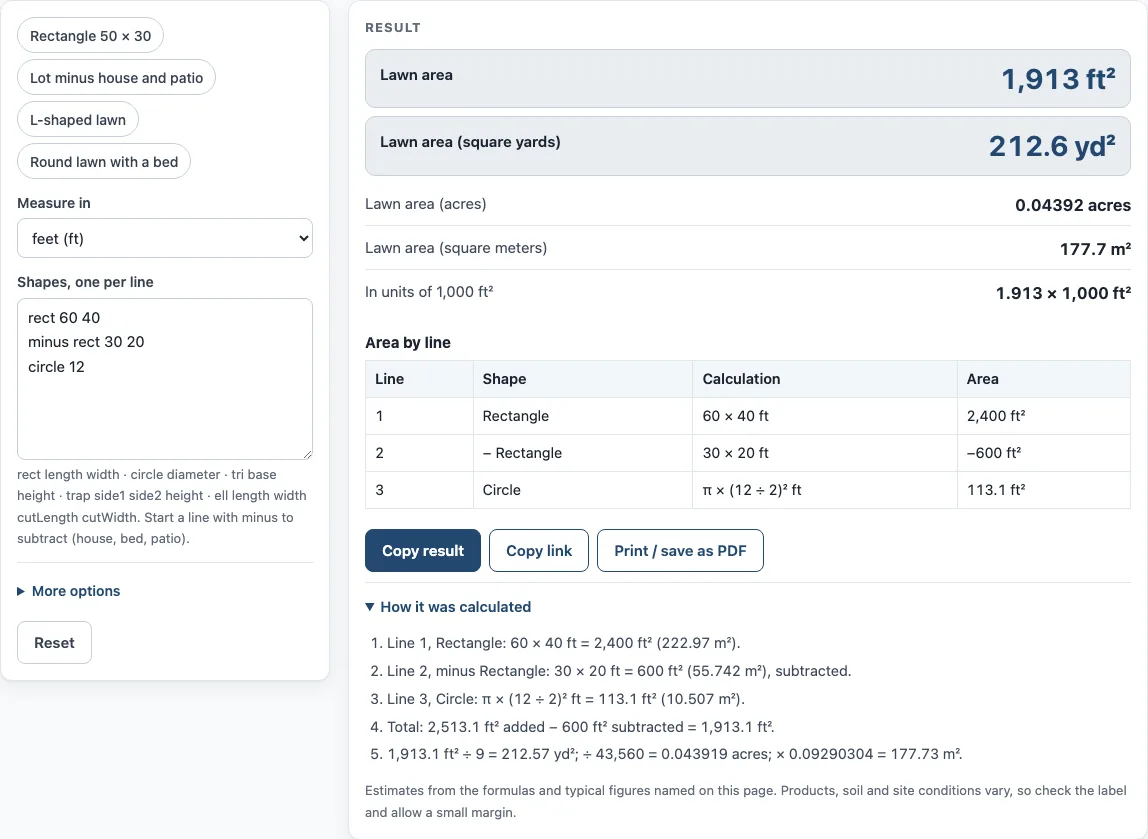
Subtraction matters most for lawns with a house or beds in them. Here is an example with a rectangle, a rectangle taken out, and a circle:
rect 60 40, minus rect 30 20, circle 12
The calculation is 2,400 − 600 + 113.1 = 1,913.1 ft². The tool also shows this as 212.6 yd², 0.04392 acres and 177.7 m². The tool shows an error if subtractions equal or exceed the added area. It also shows a warning when more than 60 % of the added area is subtracted, because that usually means the shapes or measurements need a second look.
How many square yards is my lawn?
The tool finds square yards by dividing the area in square feet by 9, since one square yard is 9 square feet. For a lawn of 1,913.1 ft², the figure is 1,913.1 ÷ 9 = 212.6 yd². This is the figure to use when a quote or product label is given per square yard.
Square meters come from a direct conversion. Because 1 ft equals exactly 0.3048 m, one square foot equals 0.09290304 m². Acres use 43,560 ft² per acre, so the same 1,913.1 ft² is 0.04392 acres. If you type your numbers in meters, the tool works in meters and still reports the square feet figure, so you can use either unit system.
Worked examples
| Input | Result |
|---|---|
| 3 shapes | 1,913.1 ft² (212.57 yd², 0.04392 acres) |
| 1 shapes | 1,500 ft² (166.67 yd², 0.03444 acres) |
| 2 shapes | 3,371.7 ft² (374.64 yd², 0.0774 acres) |
| 3 shapes | 2,174.3 ft² (241.59 yd², 0.04992 acres) |
| 2 shapes | 750 ft² (83.333 yd², 0.01722 acres) |
Calculated by the tool above; open it with the same values to see each step.
Frequently asked questions
How big is the yard if I only know its length and width?
Type it as a rectangle, using the length and then the width. For example, rect 60 40 gives 2,400 ft², which is 266.7 yd². The tool does the multiplication and the unit conversions for you.
Can I use this as a soil yard calculator?
No. This tool works out area only, in square feet, square yards, acres and square meters. It does not work out the volume of soil, so use it for the surface area of the lawn, then put that area into the Topsoil Calculator for soil depth.
Can I enter my measurements in meters?
Yes. Numbers can be in feet or meters. Results appear in all four units, so you can compare them directly.
Why did I get a warning about subtracted areas?
The warning appears when more than 60 % of the added area is subtracted. This often means a shape was entered by mistake, or a house or bed is larger than expected. Check the table to see which line has the largest subtraction.
Can I use the result for seed or sod?
Yes. Copy the square feet figure into the “Total area (already known)” option of the seed, sod, turf, flagstone or paver calculators. The 1,000 ft² helper line is useful when a label gives rates per 1,000 ft².
Does the tool upload my measurements?
No. Everything runs in your browser, nothing is uploaded, there is no sign-up, and the tool is free.
Related tools
- Grass Seed Calculator: use it when you know your lawn area and need to work out how much seed to plan for.
- Sod Calculator: use it when you plan to lay sod rather than sow seed.
- Artificial Turf Installation Cost Calculator: use it when you are comparing artificial grass installation costs for your lawn area.
- Flagstone (Flagging) Calculator: use it for a flagstone path or patio beside the lawn.
- Paver Calculator: use it when you plan pavers for a path, patio or border.
- Paver Patio Cost Calculator: use it when you want to estimate the cost of a paver patio.
- Paver Sand Calculator: use it when you need sand for laying pavers.
- Lawn Mowing Cost Calculator: Turn the lawn size into mowing time and cost.