
Flagstone (Flagging) Calculator
Enter the area and stone thickness to see how many tons of flagstone to order, shown as a range because suppliers publish different coverage per ton.
Recent
Your last 10 settings, saved only in this browser. Nothing is uploaded.
How to use the flagstone calculator
- Choose the shape of your area: rectangle, circle, triangle, or a known total.
- Enter the measurements in feet or meters. For a rectangle, enter length and width. For a circle, enter the diameter. For a triangle, enter the base and height. If you already know the total area, enter that instead.
- Under “Stone thickness”, choose 1 to 2 in, About 2 in, 2 to 3 in, or “My supplier’s coverage (type it)”. If you pick the last option, type the figure into “Coverage per ton (ft²)”. Use the supplier’s figure if you have one, because published coverage varies by stone and source.
- Check “Extra for cuts and irregular shapes (%)”. It starts at 10 %. A stone path guide advises 10 to 15 %, using the upper end for cut and fitted work. The tool shows a warning if the value is below 10 % or above 30 %.
- If you want a cost estimate, type your price in “Price per ton (optional, $)”. Leave it blank if you only need tonnage.
- Read “Flagstone needed” for the tonnage range. “To order (rounded up to half tons)” rounds that range up to the next half ton. If you typed your own coverage, you get a single tonnage instead of a range.
If a box is blank, zero, negative or not a number, the tool shows an error message instead of a result. Fix the entry and the result will appear.
How does a flagstone calculator work out tons?
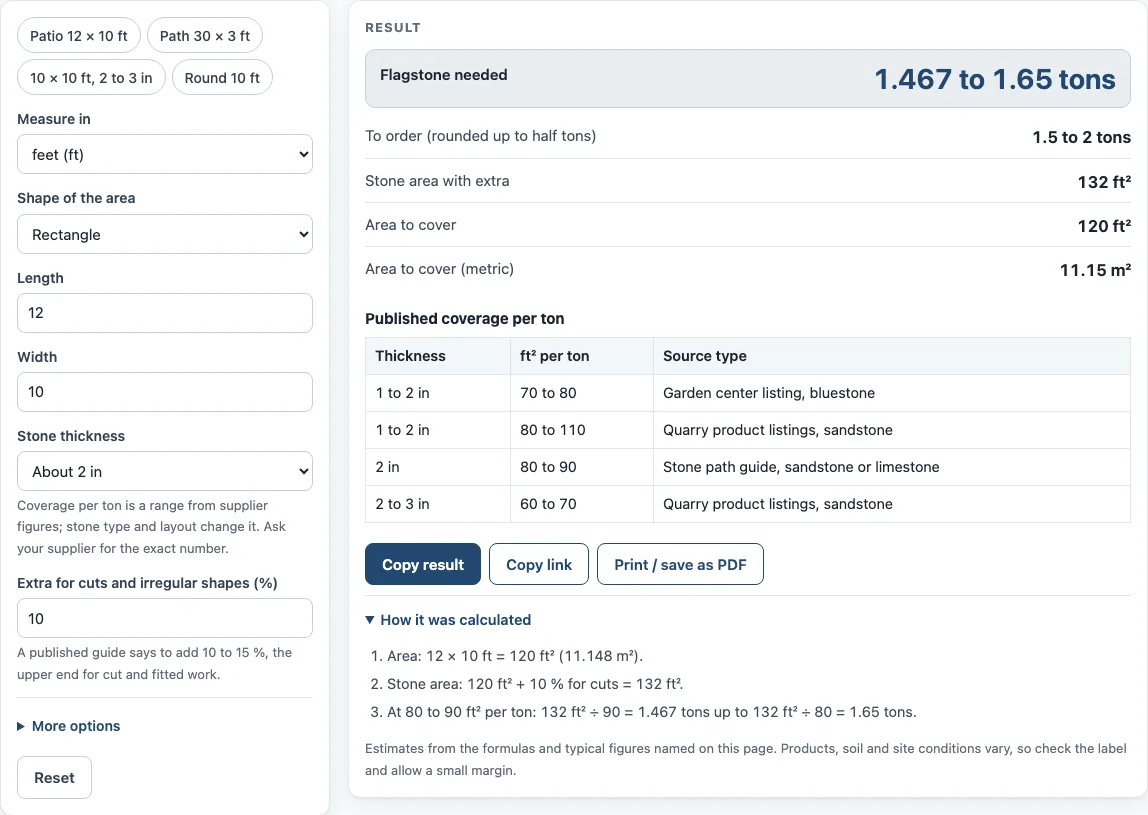
The calculator multiplies your area by the extra percentage, then divides by the coverage per ton. The formula is Tons = area × (1 + extra %) ÷ coverage per ton, with coverage in square feet per ton. For a 12 × 10 ft area, the area is 120 ft². Adding 10 % extra gives 132 ft². With 2 in stone at 80 to 90 ft² per ton, that is 1.467 to 1.65 tons.
Why is the answer a range instead of one number?
Published coverage differs by supplier and by stone, so the tool gives a range. The low end of the tons uses the highest coverage per ton, and the high end uses the lowest. Denser stones such as bluestone or quartzite cover less area per ton at the same thickness than sandstone or limestone, which makes the range wider. Sizes also vary by maker, so the same thickness can have different coverage from different sources.
The page includes a table of published coverage figures by thickness and source type, such as garden center listings and quarry product listings. For 1 to 2 in stone, those sources give 70 to 110 ft² per ton, and the two kinds of listing do not fully overlap. If you know your supplier’s figure, type it in, because it will be more accurate for your stone than a general figure.
How much extra stone should I add for cuts?
The default is 10 %, which covers a simple layout. A stone path guide advises 10 to 15 %, and the upper end suits cut and fitted work, such as around curves, corners or irregular edges. Cut and fitted stone leaves offcuts, so adding extra is a safer starting point than ordering the exact area.
The extra percentage changes the result directly. For example, a circle 12 ft across is 113.1 ft². With 2 to 3 in stone and 15 % extra, the area becomes 130.1 ft², which is 1.858 to 2.168 tons. The order result for that case is 2 to 2.5 tons.
How is the order quantity rounded?
The “To order” result takes the tonnage range and rounds it up to the next half ton. This makes it easier to order from a supplier who sells in half-ton amounts. In the 12 × 10 ft example above, 1.467 to 1.65 tons becomes an order of 1.5 to 2 tons. For a 20 × 15 ft area (300 ft²) of 1 to 2 in stone with 10 % extra, which is 330 ft², the range is 3 to 4.714 tons, and the order result is 3 to 5 tons.
Sources (checked 15 October 2026): gertens.com · mulchmound.com · arcat.com
Worked examples
| Input | Result |
|---|---|
| 120 ft², About 2 in, 10 % extra | 1.467 to 1.65 tons |
| 300 ft², 1 to 2 in, 10 % extra | 3 to 4.714 tons |
| 113.1 ft², 2 to 3 in, 15 % extra | 1.858 to 2.168 tons |
| 300 ft², My supplier's coverage (type it), 10 % extra | 3.882 tons |
| 86.11 ft², About 2 in, 12 % extra | 1.072 to 1.206 tons |
Calculated by the tool above; open it with the same values to see each step.
Frequently asked questions
What is a flagging calculator?
A flagging calculator is another name for the flagstone calculator on this page. It converts an area and a stone thickness into tons of flagstone to order.
Why does the tool show a range instead of one tonnage?
Coverage per ton changes with the stone and the supplier. The low end uses the highest coverage, and the high end uses the lowest, so you can see the likely spread before you order.
Can I use meters instead of feet?
Yes. You can enter measurements in feet or meters. The area is shown in both square feet and square meters.
Does the tool show stone prices?
No. The page does not hold prices. If you type a value into “Price per ton (optional, $)”, the tool shows the cost for the low and high ends of the tonnage range.
What if my supplier gives a different coverage figure?
Under “Stone thickness”, choose “My supplier’s coverage (type it)”, then enter their number in “Coverage per ton (ft²)”. The tool then gives a single tonnage from that figure.
What happens if I leave a box blank or enter zero?
The tool shows an error message instead of a result. Blank, zero, negative or non-numeric entries are not accepted, so enter a positive number in each box to see the tonnage.
Related tools
- Paver Calculator: Use this when your project is laid with pavers instead of flagstone.
- Paver Sand Calculator: Use this to estimate the sand needed under or between pavers.
- Lawn Area Calculator: Use this to measure the lawn area around a new patio or path.
- Sod Calculator: Use this to estimate how much sod to order for the same yard.
- Paver Patio Cost Calculator: Use this to estimate the cost of a paver patio project.