
Deck Joist Spacing Chart
Enter the deck length and joist length and a spacing to count joists, rim joists and blocking, then compare your spacing with the published maximums.
Recent
Your last 10 settings, saved only in this browser. Nothing is uploaded.
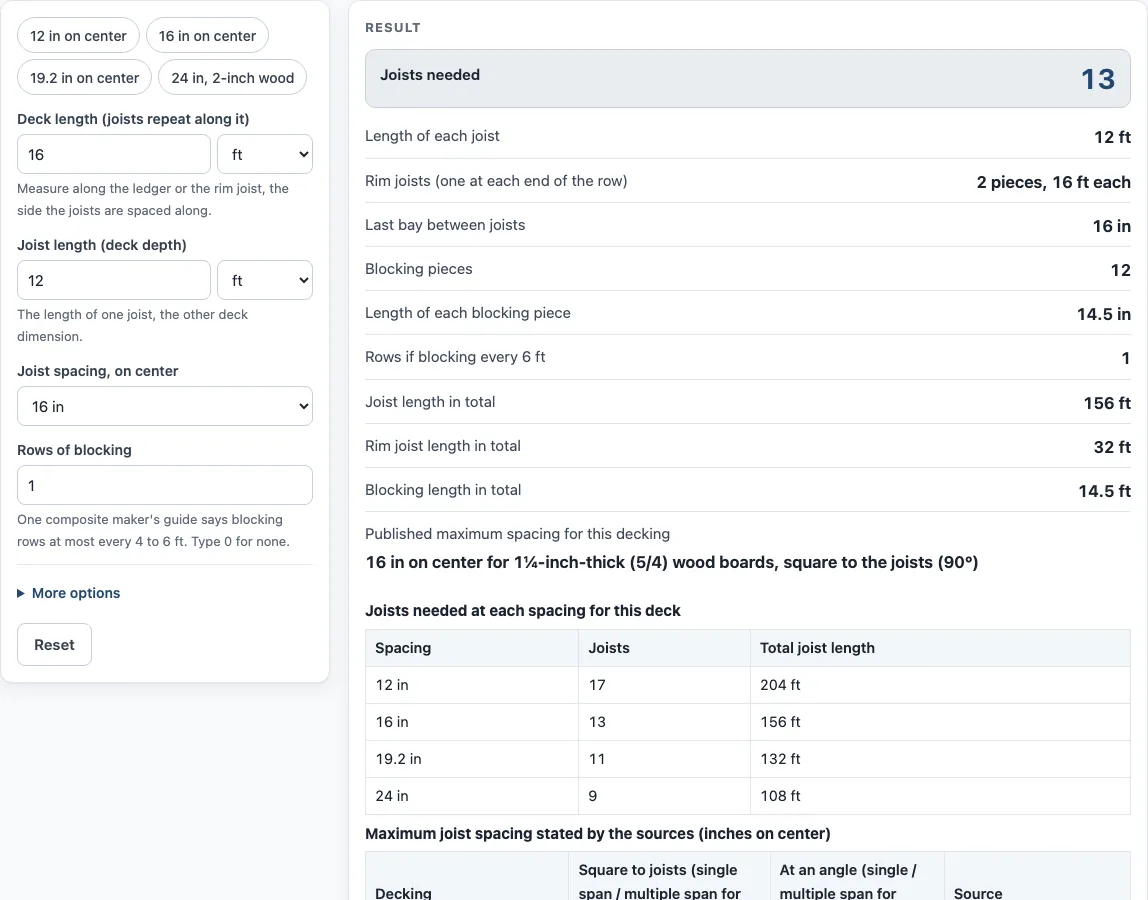
How to use the Deck Joist Spacing Calculator
- Enter the “Deck length (joists repeat along it)”, in ft, in or m. This is the side the joists are spaced along.
- Enter the “Joist length (deck depth)”. This is the other side, the length each joist runs.
- Pick a “Joist spacing, on center” of 12, 16, 19.2 or 24 in.
- Enter the number of “Rows of blocking” you plan to install between joists. Type 0 for none.
- Open “More options”. Under “Decking, for the published-maximum check” choose 1¼-inch-thick (5/4) wood, 2-inch-thick wood or composite, then under “Boards laid” choose square to the joists or at an angle.
- Read the joists needed. This count includes the two outer joists.
- Read the rim joists: 2 pieces, each as long as the deck length. If the deck is attached to a house, one of them is the ledger.
- Read the blocking pieces and the length of each piece. The tool also shows how many rows you would need if you blocked every 6 ft.
- Check the last bay between joists. The tool warns when it is less than half the spacing.
- Read any other warnings: a dimension under 2 ft or over 60 ft, spacing over 48 in, spacing over the published maximum, and spacing no larger than 1 1/2 in.
- Compare spacings in the table. It lists joist count and total joist length at 12, 16, 19.2 and 24 in for the same deck.
Change one input at a time to see how it affects the counts.
How many joists does a deck need?
The joist count comes from dividing the deck length by the joist spacing. The tool rounds that result up and adds one for the outer joist, so joists needed = ceil(length / spacing) + 1. The count includes both outer joists. The bays are the gaps between joists, and the last bay equals the length minus (bays minus 1) times the spacing.
Two worked examples show how this works. A 16 ft deck at 16 in on center is 192 in long, which gives 12 bays and 13 joists, with a last bay of 16 in. A 15 ft deck at the same spacing is 180 in long. It also gives 13 joists, but the last bay is only 4 in, so the page warns. The warning appears whenever the last bay is under half a spacing.
Rim joists are simpler: there are two pieces, each as long as the deck length. Blocking pieces equal the rows multiplied by the joists minus one. Each piece is the spacing minus 1 1/2 in, the actual thickness of a 2x joist according to PS 20-20 Table 3. For a 20 ft deck at 24 in with two rows, the tool gives 11 joists and 20 blocking pieces of 22 1/2 in.
What is the maximum joist spacing for a deck?
The tool checks your spacing against published maximums. The 2021 IRC Table R507.7 gives maximum on-center spacing for wood decking laid perpendicular to the joists: 12 in for 1 1/4-inch-thick wood and 24 in for 2-inch-thick wood in single span, and 16 in and 24 in in multiple span. For diagonal boards, the figures are 8 in and 18 in in single span, and 12 in and 24 in in multiple span. The table is keyed to 1 1/4-inch-thick and 2-inch-thick wood, not to nominal 5/4, while the tool’s option is labelled 1 1/4-inch-thick (5/4).
The table’s footnotes add three points. The maximum angle is 45 degrees from perpendicular for wood boards. A board supported by two joists is single span, and a board supported by three or more joists is multiple span. Other maximum spans from an accredited lumber grading or inspection agency are also allowed. The tool’s check uses the multiple-span figures: 16 in square and 12 in diagonal for 1 1/4-inch wood, and 24 in both ways for 2-inch wood.
Composite decking follows its own figures. Three manufacturers’ guides give 16 in on center for boards square to the joists and 12 in for boards at an angle. One manufacturer allows 24 in for its MAX boards, with 16 in when diagonal. The IRC sends composite decking to R507.2 and to the maker’s requirements, and sizes vary by maker. The check uses 16 in square and 12 in diagonal for composite. A warning appears when your chosen spacing is larger than the value the check uses.
Results are calculated from your inputs. Joist spacing and framing are set by your local code, permit rules and your decking maker’s guide, so check those before you build.
Sources (checked 15 October 2026): nist.gov · assets.timbertech.com · trex.com · moistureshield.com
Worked examples
| Input | Result |
|---|---|
| 16 ft deck, joists 16 in on center | 13 joists, 12 blocking pieces |
| 12 ft deck, joists 12 in on center | 13 joists, 0 blocking pieces |
| 20 ft deck, joists 24 in on center | 11 joists, 20 blocking pieces |
| 5 m deck, joists 19.2 in on center | 12 joists, 11 blocking pieces |
Calculated by the tool above; open it with the same values to see each step.
Frequently asked questions
Is this a deck joist span chart?
No. The tool counts joists, rim joists and blocking, and compares your spacing with published maximums. It gives no span tables and no structural advice.
Does the tool check my deck against building code?
No. Results are calculated from your inputs, and the page does not judge a deck against code. Local code, permit rules and your decking maker’s guide decide what is allowed, so check them.
Why does my result show a warning?
Warnings appear for a dimension under 2 ft or over 60 ft, spacing over 48 in, spacing over the published maximum, spacing no larger than 1 1/2 in, or a last bay under half a spacing.
What maximum spacing does the tool use for composite decking?
The check uses 16 in on center for boards square to the joists and 12 in for boards at an angle. One manufacturer allows 24 in for its MAX boards, so sizes vary by maker.
Can I check 2-inch wood with this tool?
Yes. Choose the decking type under “More options”, then enter your deck and joist dimensions. The published check uses 24 in for 2-inch wood both square and diagonal.
Is the calculator free, and is my data uploaded?
It is free, and no sign-up is needed. Everything runs in your browser, and nothing is uploaded.
Related tools
- Deck Board Calculator: use it to work out how many deck boards a deck needs.
- Deck Board Dimensions: use it to look up typical deck board sizes from the named sources.
- Cost to Build a Deck Calculator: use it when you want to estimate costs using prices you type in.
- Deck Stain Calculator: use it when you are planning how much stain a deck needs.
- Deck Footing Calculator: Size and count the footings under the same deck.