
Deck Board Dimensions
Pick a wood or composite board and a length to see its actual size and how much deck it covers, with the nominal and actual size chart below.
Recent
Your last 10 settings, saved only in this browser. Nothing is uploaded.
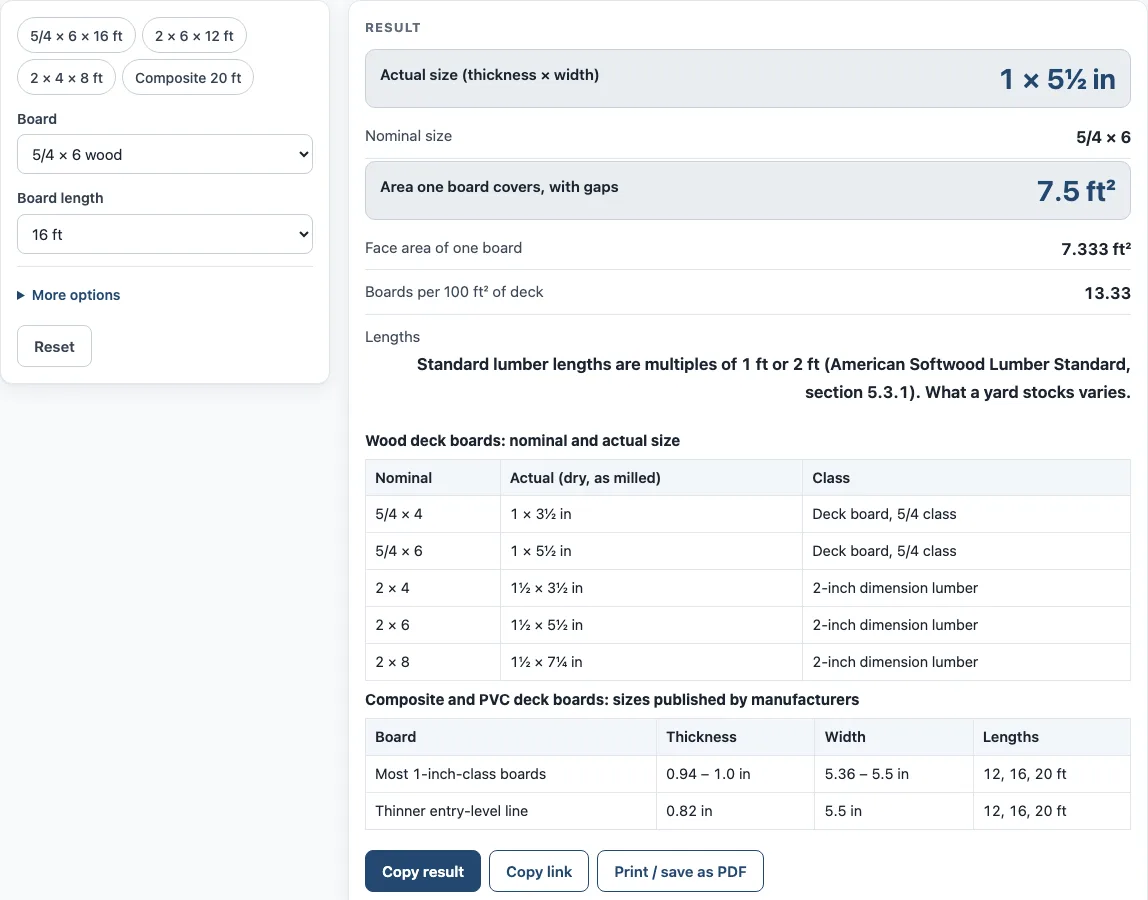
How to use the deck board size tool
- Open the “Board” control and choose a board: 5/4 × 4, 5/4 × 6, 2 × 4, 2 × 6 or 2 × 8 wood, or a composite board 5.36, 5.4 or 5.5 in wide.
- Set “Board length” to 8, 10, 12, 14, 16 or 20 ft.
- Open “More options” and enter the “Gap between boards (in)”, for example 0.125 for 1/8 in. It only affects the coverage lines.
- Read the “Actual size (thickness × width)” and the “Nominal size” of the board. The actual size is the measured dimension; the nominal size is the name used when you buy it.
- Read the “Face area of one board”, which is the area of the board’s top surface in square feet.
- Read the “Area one board covers, with gaps”. This includes the gap, so it is the figure to use for planning.
- Read the “Boards per 100 ft² of deck”. Divide your deck area by 100 and multiply by this number to estimate how many boards you need.
- The “Lengths” line notes which lengths are standard. If a warning appears, the gap is over 1/2 in, so check the gap value before you use the result.
The page also has four presets: 5/4 × 6 × 16 ft, 2 × 6 × 12 ft, 2 × 4 × 8 ft and composite 20 ft with a 1/4 in gap. Use a preset as a starting point, then change the inputs to match your plan. For composite boards, the page shows ranges rather than a single value, so compare the numbers with your board’s label.
What do the nominal and actual sizes of deck boards mean?
Nominal sizes are the names lumber yards use, such as 2 x 6 or 5/4 x 6. Actual sizes are smaller because lumber is milled and dried. The tool uses the minimum dressed dry sizes from PS 20-20 Table 3: 5/4 x 4 is 1 x 3 1/2 in, 5/4 x 6 is 1 x 5 1/2 in, 2 x 4 is 1 1/2 x 3 1/2 in, 2 x 6 is 1 1/2 x 5 1/2 in, and 2 x 8 is 1 1/2 x 7 1/4 in.
The same standard also lists larger “green” sizes, such as 2 x 6 at 1 9/16 x 5 5/8 in, because lumber shrinks as it dries. The page uses the dry sizes. Standard lengths are multiples of 1 ft or 2 ft (PS 20-20 section 5.3.1), but which lengths a yard stocks varies.
Composite boards are not governed by the same naming system. Published thickness ranges from 0.82 to 1.0 in, and published width ranges from 5.36 to 5.5 in. Most lines fall between 0.94 and 1.0 in thick. Sizes differ by line and by maker, and one manufacturer lists different values on different product pages. The tool keeps these values as ranges and never averages them.
How many boards do I need to cover a deck?
Start with the face area of one board: width x length / 144, which gives square feet when both width and length are in inches (a 16 ft board is 192 in). The area one board covers with gaps is (width + gap) x length / 144. Boards per 100 ft² is 100 divided by that covered area.
For example, a 5/4 x 6 board of 16 ft with a 1/8 in gap has a face area of 5.5 x 192 / 144 = 7.333 ft². Including the gap, it covers (5.5 + 0.125) x 192 / 144 = 7.5 ft², so you need 100 / 7.5 = 13.33 boards per 100 ft².
A 2 x 6 board of 12 ft with a 1/8 in gap covers 5.625 ft², which is 17.78 boards per 100 ft². A 2 x 4 board of 8 ft with a 1/4 in gap covers 2.5 ft², which is 40 boards per 100 ft².
The result is only as accurate as the sizes and gap you enter. The tool does not add an allowance for cutting or waste.
Sources (checked 15 October 2026): nist.gov · trex.com · timbertech.com · fiberondecking.com · moistureshield.com · trex.com · timbertech.com
Worked examples
| Input | Result |
|---|---|
| 5/4 × 6 wood, 16 ft, 0.125 in gap | one board covers 7.5 ft², 13.33 boards per 100 ft² |
| 2 × 6 wood, 12 ft, 0.125 in gap | one board covers 5.625 ft², 17.78 boards per 100 ft² |
| 2 × 4 wood, 8 ft, 0.25 in gap | one board covers 2.5 ft², 40 boards per 100 ft² |
| Composite, 5.4 in wide, 20 ft, 0.25 in gap | one board covers 9.417 ft², 10.62 boards per 100 ft² |
Calculated by the tool above; open it with the same values to see each step.
Frequently asked questions
Why is a 2 x 4 not 2 inches by 4 inches?
The 2 x 4 is the nominal name. The actual size of a dry 2 x 4 is 1 1/2 x 3 1/2 in, according to the minimum dressed dry sizes in PS 20-20 Table 3.
Why do composite boards show a range of sizes?
Composite sizes are set by each manufacturer and differ by product line. The tool shows ranges, such as 0.94 to 1.0 in thick, and does not pick one value.
Does the tool use green or dry lumber sizes?
It uses the dry sizes. Green sizes are larger because lumber shrinks as it dries, and the tool does not show them.
What does “Boards per 100 ft²” mean?
It is the number of boards needed to cover 100 square feet, counting the gap between boards. Divide your deck area by 100 and multiply by this number to estimate your total.
Can I use the result to decide how many boards to buy?
Use it as a planning estimate. The tool does not add waste, so decide how many extra boards you want for cuts and check the label of the board you choose.
Does the tool upload my numbers?
No. The tool runs in your browser, and nothing you enter is uploaded.
Related tools
- Deck Board Calculator: use it to work out how many boards your deck needs.
- Cost to Build a Deck Calculator: use it to estimate what a deck build may cost.
- Deck Joist Spacing Chart: use it to check joist spacing for your boards.
- Deck Stain Calculator: use it to estimate how much stain your deck needs.
- Stair Calculator: use it to plan the rise and run of deck stairs.
- Stair Stringer Calculator: use it to size the stringers for a set of stairs.