
Deck Board Calculator
Enter the deck length and width, pick the board and its length, and get the number of boards to buy with waste, the board length in the deck and the joists at your spacing.
Recent
Your last 10 settings, saved only in this browser. Nothing is uploaded.
How to use the Deck Board Calculator
- Enter the “Deck length” and “Deck width”. Choose ft, in or m as the unit for each.
- Under “Board”, pick 5/4 × 6 wood, 2 × 6 wood, 2 × 4 wood, one of the three composite widths, or “Other width (type it)”.
- Choose the “Board length you can buy”: 8, 10, 12, 14, 16 or 20 ft.
- Open “More options” to reach the rest. “Boards run along the deck” sets whether the boards run along the length or the width.
- Check the “Gap between boards (in)”. The default is 0.125, which is 1/8 in. Type another value if your product’s guide gives one.
- Set the “Waste allowance (%)”. The default is 5. Raise it for diagonal layouts and picture frames.
- Choose the “Joist spacing, on center”: 12, 16, 19.2 or 24 in. Read any warning that appears before you go on.
- Optionally, type a price per board and a sales tax percentage to get a cost.
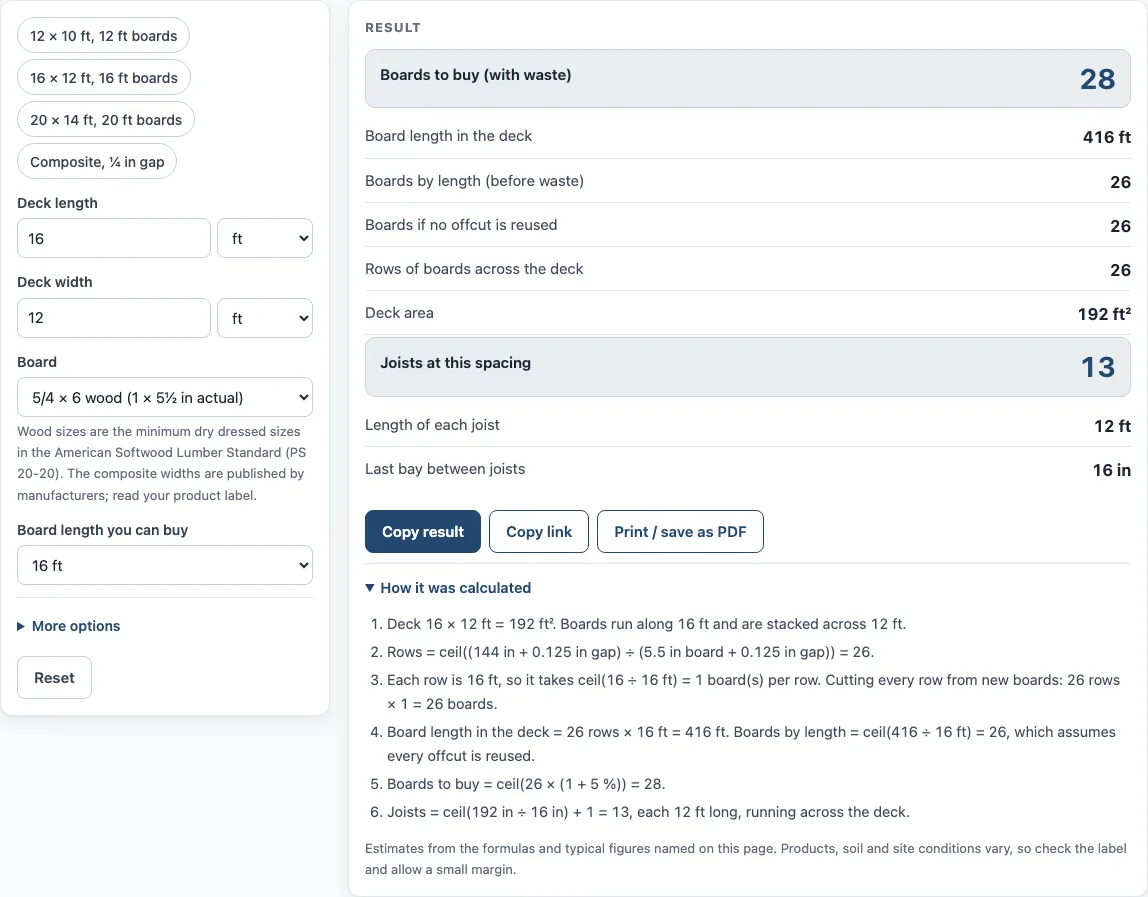
- Read the results: “Boards to buy (with waste)”, boards by length, “Joists at this spacing” and the last bay between joists. If you will not reuse offcuts, also check “Boards if no offcut is reused”.
If you want a starting point, use one of the presets: 12 × 10 ft with 12 ft boards, 16 × 12 ft with 16 ft boards, 20 × 14 ft with 20 ft boards, or composite with a 1/4 in gap. Then change any values that differ from your deck.
How does a deck board calculator count the boards you need?
A deck board calculator counts boards in two steps. First it works out how many rows of boards cover the deck width, then how many board lengths cover each row. Each count is rounded up, because you cannot buy part of a board.
Rows across the deck use this formula: rows = ceil((deck dimension across + gap) / (board width + gap)). Each board plus the gap after it takes up one board width and one gap. The last board has no gap after it, so adding one gap to the deck width gives the total that the boards must cover.
Take the default 16 x 12 ft deck with 5/4 x 6 boards, which are 5.5 in wide, a 1/8 in gap, and boards running along the 16 ft side. The 12 ft width is 144 in. (144 + 0.125) ÷ (5.5 + 0.125) = 25.6, which rounds up to 26 rows.
Boards per row = ceil(run length ÷ board length). With 16 ft boards on a 16 ft run, that is one board per row. Boards by length = ceil(26 × 16 ÷ 16) = 26 boards, which is 416 ft of board. The 5 % waste gives 26 × 1.05 = 27.3, rounded up to 28 boards to buy.
Boards by length assumes every offcut is reused. If offcuts cannot be reused, the “Boards if no offcut is reused” line multiplies rows by boards per row instead. That number is never lower than the boards by length figure.
What gap and joist spacing should I enter?
Enter the gap that your decking product’s installation guide gives. The 1/8 in default is a starting point, not a fixed rule. The AWC DCA 6 deck guide says wood decking is spaced approximately 1/8 in apart. Two composite installation guides give 1/8 to 1/4 in and 1/4 in, and one of them says 1/4 in side to side. The tool shows the 1/8 to 1/4 in range in its help line, and it warns if the gap is over 1/2 in.
Joists = ceil(run length ÷ spacing) + 1, running across the deck. Each joist is as long as the other deck dimension. For the 16 x 12 ft example at 16 in on center, 16 ÷ (16/12) = 12, so 12 + 1 = 13 joists, each 12 ft long. The last bay between joists is also shown.
The tool warns when joist spacing is over 16 in with 5/4 wood. The 2021 IRC Table R507.7 lists 16 in for 1 1/4-inch-thick wood decking on three or more joists, and 12 in on two joists. It also warns when spacing is over 16 in with composite, because installation guides give 16 in. A warning is a prompt to check your guide and code, not a verdict on your design.
Sources (checked 15 October 2026): nist.gov · web-media.awc.org · trex.com · assets.timbertech.com · moistureshield.com
Worked examples
| Input | Result |
|---|---|
| 16 ft × 12 ft deck, 5/4 × 6 wood (1 × 5½ in actual), 16 ft boards | 28 boards (416 ft of board), 13 joists |
| 20 ft × 12 ft deck, 2 × 6 wood (1½ × 5½ in actual), 12 ft boards | 47 boards (520 ft of board), 16 joists |
| 14 ft × 10 ft deck, Composite, 5.4 in wide, 20 ft boards | 18 boards (308 ft of board), 12 joists |
| 5 m × 4 m deck, 5/4 × 6 wood (1 × 5½ in actual), 16 ft boards | 32 boards (472.4 ft of board), 11 joists |
Calculated by the tool above; open it with the same values to see each step.
Frequently asked questions
Is this the same as a deck estimator or a deck material calculator?
Yes, in the sense that it counts boards and joists from your measurements. It counts those materials only, so it does not estimate labor or the whole project.
Can I use it to plan the whole deck project?
Not fully. Butt-joint gaps, borders, breaker boards and stair treads are not included, so add those yourself. The cost is boards to buy × your typed price × (1 + tax %). The page holds no prices, so a cost appears only when you type one.
Does it work for both wood and composite?
Yes. Wood widths are the minimum dressed dry sizes in the American Softwood Lumber Standard (PS 20-20, Table 3). Composite widths vary by maker: 5.36, 5.4 and 5.5 in are published widths, and the tool offers all three without averaging them. You can also type any width, so check the width on your product.
Do the results account for building code?
The results are calculated from your inputs only. Whether a deck is allowed, and how it must be built, depends on your local code and permit rules, so check your manufacturer’s installation guide and your local code for gap, joist spacing and fastening.
Are my measurements uploaded anywhere?
No. The tool runs in your browser, and nothing you enter is uploaded. There is no sign-up, and it is free to use.
Can I switch between feet, inches and meters?
Yes. Choose ft, in or m for the deck length and width. Check that your board lengths match the unit you pick before you compare results with a store list.
Related tools
- Deck Board Dimensions: check board widths and lengths before you enter them.
- Cost to Build a Deck Calculator: estimate the wider cost of building a deck.
- Deck Joist Spacing Chart: compare joist spacing options before you choose one.
- Deck Stain Calculator: estimate how much stain a finished deck will need.
- Stair Calculator: work out the rise and run for stairs up to or down from a deck.
- Stair Stringer Calculator: size the stringers for a deck staircase.
- Deck Footing Calculator: Size the footings that hold the deck up.