
Compost calculator
Enter the area and depth to get cubic yards and bags of compost. Or switch modes to find the carbon:nitrogen ratio of your pile.
Recent
Your last 10 settings, saved only in this browser. Nothing is uploaded.
How to use the Compost Calculator
- Under “What do you want to work out?”, choose “How much compost to spread” for a bed or lawn, or “Carbon:nitrogen ratio of a mix” to check materials.
- For spreading, enter the “Area to cover” and choose square feet or square meters.
- Enter the “Depth of compost” and choose inches or centimeters.
- Enter the “Bag size (cubic feet)” so the bag count matches the bags you plan to buy.
- Read the results: cubic yards, cubic feet, cubic meters, bags (rounded up), and “Per 1,000 square feet at this depth”. Check the depth against the table of published depths below the tool.
- For the ratio, enter Material A, Material B and, if you want, Material C, each with an amount in pounds or kilograms.
- For each material, pick Grass clippings or Leaves, or choose “My own values” and enter its C:N ratio and nitrogen percent of dry weight.
- Enter a moisture percent for any wet material. Leave it at 0 if the amount is a dry weight.
- Check the “Target C:N ratio”, which starts at 30, and change it if your project needs another value.
- Read the result. It says whether the mix is above or below the target and how much of Material B, as received, would reach it, with the other materials fixed.
If an amount is blank, zero, negative or not a number, or if a moisture percent is 100% or more, the tool shows an error instead of a result.
How much compost do I need?
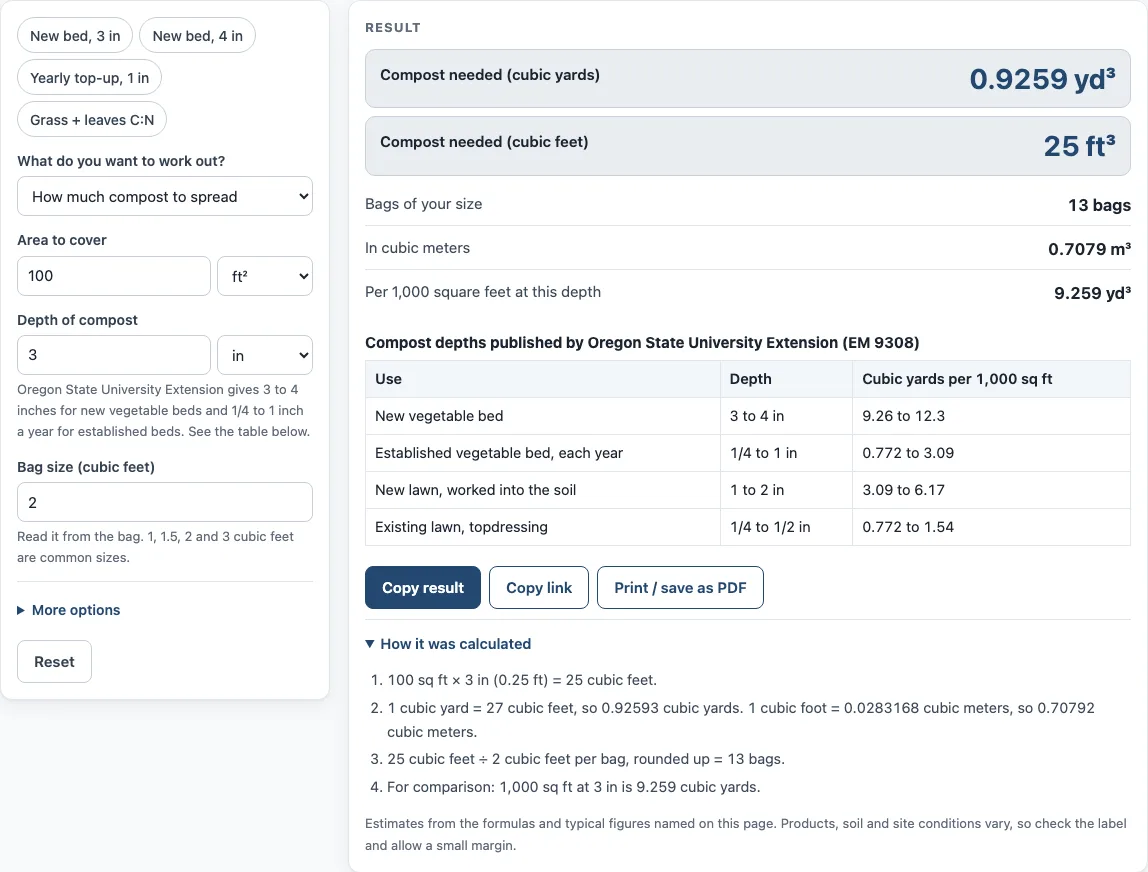
Multiply the area by the depth to get the volume, then convert to cubic yards by dividing by 27, since 1 cubic yard is 27 cubic feet. For example, 100 square feet at 3 inches needs 25 cubic feet, which is 0.9259 cubic yards, or 13 bags of 2 cubic feet, with the bag count rounded up.
The calculator’s table uses depths published by Oregon State University Extension (EM 9308): 3 to 4 inches for new vegetable beds, 1/4 to 1 inch a year for established beds, 1 to 2 inches for new lawns, and 1/4 to 1/2 inch for topdressing an existing lawn. Each depth implies a cubic yard figure per 1,000 square feet, which the table lists. Oregon State’s own example is 800 square feet at about 3 inches, which comes to 7.41 cubic yards. The calculator gives 7.407 for the same inputs.
The calculator shows a warning for a depth over 4 inches, which is above the top of the published layer depths, and for an area over an acre. A warning does not mean your plan is wrong. It means your inputs fall outside the usual ranges, so check them before buying.
What is a compost green to brown ratio?
The carbon to nitrogen (C:N) ratio of a mix is its total carbon divided by its total nitrogen. The calculator uses the method from Cornell Waste Management Institute: carbon equals nitrogen multiplied by the C:N ratio of each material, and the mix ratio is total carbon divided by total nitrogen.
The target starts at 30, based on Cornell Cooperative Extension’s statement that the ideal is about 30 parts carbon to 1 part nitrogen by weight. The tool uses that single figure of about 30:1 as the starting target, and you can change it.
Cornell’s estimated C:N ratios are useful when you enter your own values: grass clippings 19:1, food wastes 15:1, horse manure 25:1, leaves 40 to 80:1, and wood and sawdust 300 to 700:1. The grass clippings and leaves defaults come from Cornell’s calculator page. Grass clippings use 2.4% nitrogen, 45% carbon and a C:N ratio of 18.75. Leaves use 0.75% nitrogen, 50% carbon and a C:N ratio of 66.67.
As a worked example, 10 lb of dry grass clippings and 10 lb of dry leaves give 9.5 units of carbon and 0.315 of nitrogen. That is a ratio of 30.16:1, slightly above the 30:1 target. If material B has a C:N ratio on the same side of the target as the other materials, the result says B cannot reach the target by adding more of it.
Sources (checked 15 October 2026): extension.oregonstate.edu · compost.css.cornell.edu · css.cornell.edu
Worked examples
| Input | Result |
|---|---|
| 100 ft² at 3 in | 0.9259 cubic yards (25 cubic feet), 13 bags of 2 cubic feet |
| 4 m² at 5 cm | 0.2616 cubic yards (7.063 cubic feet), 5 bags of 1.5 cubic feet |
| 800 ft² at 3 in | 7.407 cubic yards (200 cubic feet), 100 bags of 2 cubic feet |
| A: 10 lb, B: 10 lb | C:N of the mix 30.16:1 |
| A: 5 kg, B: 1 kg | C:N of the mix 21.9:1 |
Calculated by the tool above; open it with the same values to see each step.
Frequently asked questions
How much is a yard of compost?
A cubic yard is 27 cubic feet. This calculator reports volume only and has no price fields, so multiply the cubic yards by the price your supplier quotes.
How much does a yard of compost weigh?
The calculator does not report weight. It gives volume in cubic yards, cubic feet and cubic meters, and it uses weights only for the material amounts you enter in ratio mode.
How much compost to add to soil?
Start with the depth that matches your project. Use 3 to 4 inches for new vegetable beds, 1/4 to 1 inch a year for established beds, 1 to 2 inches for new lawns, and 1/4 to 1/2 inch for topdressing an existing lawn. Then enter your area in spread mode.
Why does the calculator show a warning?
A warning appears when the depth is over 4 inches or the area is over an acre. In ratio mode, one appears for a C:N ratio under 5 or over 1,000, or a nitrogen share over 20% of dry weight. These are unusual values, so check the numbers and units.
What does above or below target mean?
The result compares the mix’s C:N ratio with the target. Above target means the mix has more carbon for each part of nitrogen. Below target means it has more nitrogen for each part of carbon.
Can I use my own ratio values?
Yes. Instead of Grass clippings or Leaves, choose “My own values” and enter your own C:N ratio and nitrogen percent for any material. Add a moisture percent if the material is wet.
Related tools
- Raised bed soil calculator: use it to estimate the soil mix for a raised bed before you add compost.
- Square foot gardening chart: use it to plan the square-foot layout of a bed that you will fill with compost.
- Plant spacing calculator: use it to work out how many plants fit in a bed once the compost is spread.
- Topsoil calculator: use it to size topsoil for a bed or lawn repair.
- Mulch calculator: use it to work out mulch for the top of the bed.