
Artificial Turf Installation Cost Calculator
Enter the lawn size and roll width to see the turf to order, seams and infill, then type your quotes to add up the installed cost. No prices are built in.
Recent
Your last 10 settings, saved only in this browser. Nothing is uploaded.
How to use the Artificial Grass Calculator
- Under “Shape of the area”, pick Rectangle, Circle, Triangle or Total area (already known).
- Under “Measure in”, choose feet or meters.
- Enter the size fields that appear for your shape (Length and Width, Diameter, Base and Height, or Total area).
- Pick the “Roll width (ft)”: 15 ft, 12 ft or 7.5 ft, or choose Other width and type it. Use the width your seller gives.
- For a rectangle, “Trim per strip (ft)” adds length to each strip, for example for an overlap before seaming. The default is 0.
- For a circle, triangle or known area, set “Extra for cuts (%)”. It defaults to 0, and a warning shows until you change it. These shapes do not use a strip layout.
- Check “Infill (lb per ft²)”. The default is 2; read your turf’s own instructions first. Leave it blank to skip infill. A warning appears above 3.5.
- Set “Infill bag size (lb)”. The default is 50.
- Type your prices: turf per ft² of turf bought, infill per bag, installation per ft² of lawn, other costs, delivery, and sales tax on materials. Leave a line blank to leave it out.
- Read the results: turf to order in linear feet, layout, seams, left over, infill pounds and bags, and the “Total at your prices” once you have typed a price.
If an input is blank, zero, negative or not a number, an error message appears instead of a result. Everything runs in your browser.
How does the calculator work out the turf, seams and infill?
For a rectangle, the calculator tests two ways of cutting strips from the roll and uses the layout that buys fewer square feet. Roll run along the length needs ceil(width ÷ roll width) strips, and roll run along the width needs ceil(length ÷ roll width) strips. “Ceil” means rounding up to the next whole strip. Each strip is lengthened by the trim you enter, and seams = strips − 1.
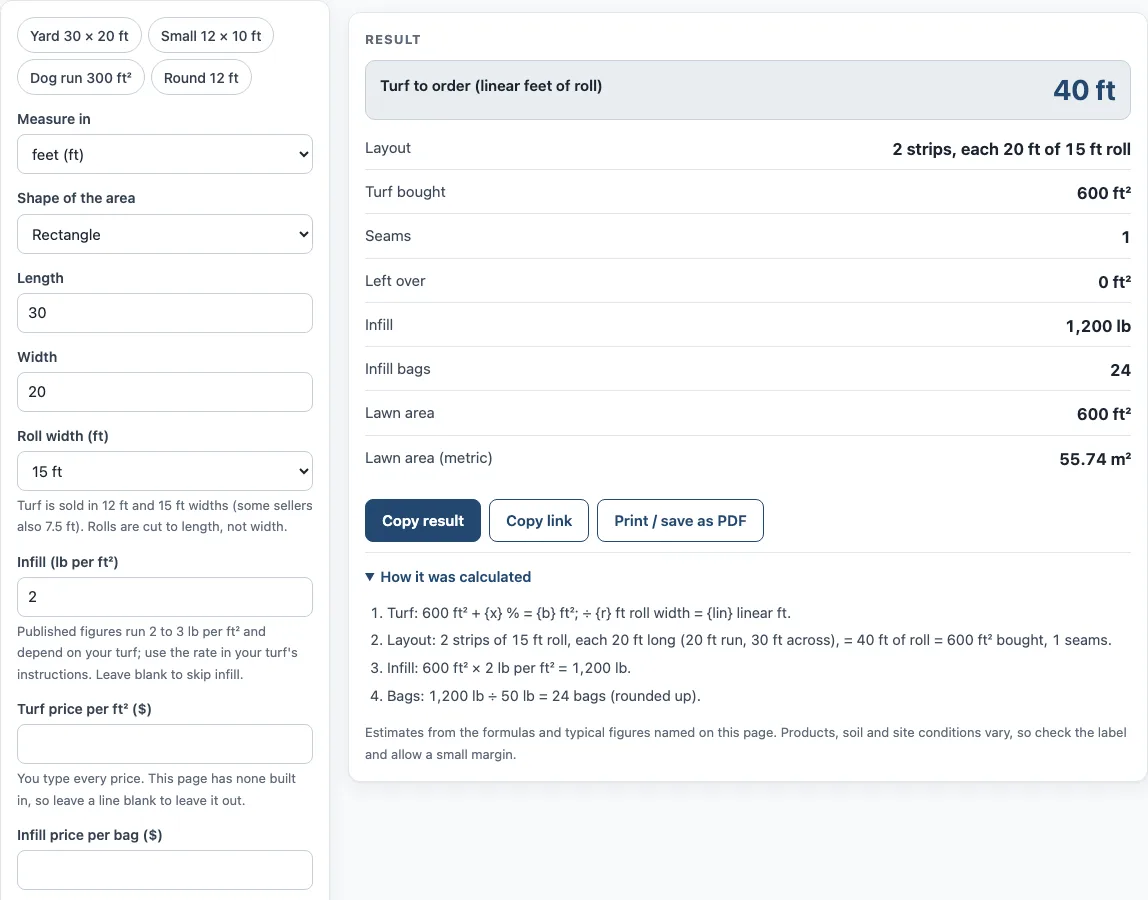
For example, a 30 × 20 ft lawn on a 15 ft roll needs 2 strips of 20 ft, which is 40 linear ft. That covers 600 ft² with one seam and no offcut. A 25 × 14 ft lawn on a 12 ft roll with 0.5 ft trim needs 3 strips of 14.5 ft, which is 43.5 linear ft or 522 ft². That gives 2 seams and 172 ft² left over.
Other shapes have no strip layout. Turf bought = area × (1 + extra %), and linear feet = turf bought ÷ roll width. One retailer’s guide suggests about 20 % for most lawns, but the right figure depends on your lawn, so you choose it.
Artificial turf infill is the material spread into the turf to help the fibres stand upright. Infill in pounds = area × rate in lb/ft². The default rate is 2 lb/ft². Published guides give about 2 to 2.5 and 2 to 3 lb/ft², and the rate depends on your turf, so the turf’s own instructions come first. One other guide gave a figure about ten times higher, which does not match the rest, so the tool does not use it. Infill bags = pounds ÷ bag size, rounded up. For 600 ft² at 2 lb/ft², that is 1,200 lb, or 24 bags of 50 lb.
How is the installed cost total worked out?
Materials are the turf bought at your price per ft², plus the infill bags at your price per bag. Sales tax applies to materials only. Installation is your price per ft² multiplied by the lawn area. Total = materials + tax + installation + other + delivery.
Take the 30 × 20 ft example at $2.50 per ft² of turf, $12 per bag of infill, $4 per ft² installation, 7 % tax on materials and $60 delivery. Turf is $1,500 and 24 bags of infill are $288, which makes materials $1,788. Tax is $125.16, installation is $2,400, and delivery is $60. The total is $4,373.16, or $7.29 per ft². These prices are only an example typed into the tool, not built-in values.
Base gravel is not calculated on this page, so add it separately if your project needs it.
Sources (checked 15 October 2026): greatmats.com · syntheticgrassstore.com · nexgenlawns.com
Worked examples
| Input | Result |
|---|---|
| 600 ft², 15 ft roll | 40 linear ft of roll (600 ft²) |
| 350 ft², 12 ft roll | 43.5 linear ft of roll (522 ft²) |
| 800 ft², 15 ft roll | 64 linear ft of roll (960 ft²) |
| 113.1 ft², 15 ft roll | 9.048 linear ft of roll (135.7 ft²) |
| 600 ft², 15 ft roll | 40 linear ft, total $4,373.2 |
Calculated by the tool above; open it with the same values to see each step.
Frequently asked questions
How much does turf cost?
The calculator has no prices built in. Type in your turf price per ft² of turf bought, and the Total shows what your project comes to with the other prices you enter.
What does artificial lawn installation cost?
The installed cost is your installation price per ft² of lawn, plus the other lines you type in. The Total adds materials, tax, installation, other costs and delivery together.
Does the fake grass installation cost include base gravel?
No. Base gravel is not calculated on this page. Add its cost yourself if your project needs it.
How much infill for synthetic grass do I need?
Infill is the lawn area multiplied by your rate in lb/ft². The default is 2 lb/ft², but check your turf’s own instructions first. The tool rounds the number of bags up.
Why does the tool show a warning?
A warning appears when the infill rate is above 3.5 lb/ft², when the extra for cuts is left at 0 % on a circle, triangle or known area, when it is above 40 %, and when you type an infill price without an infill rate and bag size. Check the values against your turf’s instructions and your own layout.
Can I use the calculator for a circle or triangle?
Yes. For these shapes, the tool multiplies the area by 1 plus your extra for cuts percentage, then divides by the roll width to get linear feet. There is no strip layout for these shapes.
Related tools
- Lawn Area Calculator: use it to find the area of your lawn before you enter its size here.
- Sod Calculator: use it if you are comparing real sod with an artificial lawn.
- Grass Seed Calculator: use it if you are planning a natural lawn instead of artificial turf.
- Paver Calculator: use it to work out pavers for a patio or path near your lawn.
- Paver Patio Cost Calculator: use it to estimate the cost of a paver patio using prices you type in.
- Paver Sand Calculator: use it to estimate the sand needed for laying pavers.
- Flagstone (Flagging) Calculator: use it to plan flagstone for a path or patio alongside your lawn.